Frequently Asked Questions
Instead of creating a separate subpage for every piece of information, a keinaufwand website lets you make specific information available to your visitors in an FAQ.
An FAQ helps you communicate with your website visitors in several ways:
- Questions and answers are brought together on one page, making your website clearer and easier to use
- Visitors find the information they're looking for, and find it faster
- You save time and don't have to answer the same questions over and over
In this article
Add a Frequently Asked Question
- In the admin panel, go to Websites > FAQ.
- Click Add question.
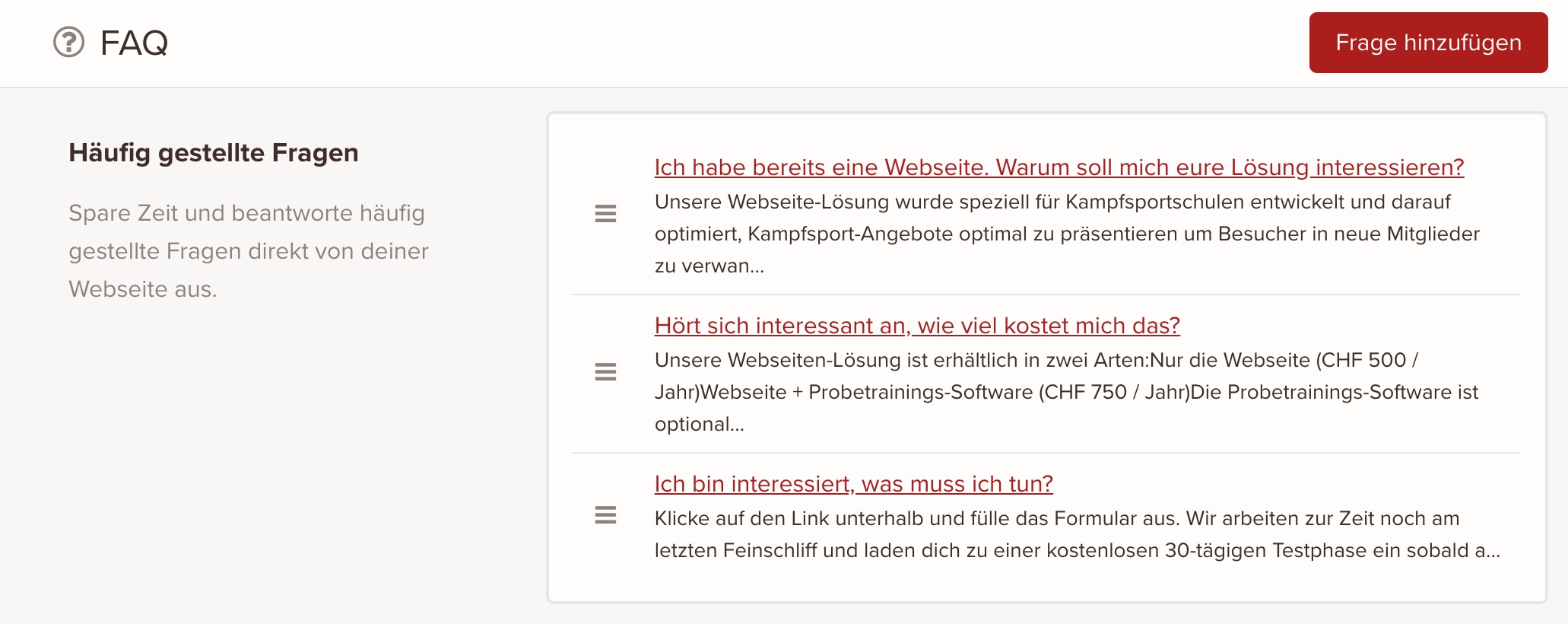
- Add a question (or a title).
- Add the answer to the question. This field uses the rich text editor, so you can format the answer.
- Click Save once you're happy with the content and settings you've entered.
Edit a Frequently Asked Question
To edit a frequently asked question:
- In the admin panel, go to Websites > FAQ.
- Click the question you want to edit.
- Adjust the question or answer.
- Click Save.
Delete a Frequently Asked Question
To delete a frequently asked question:
- In the admin panel, go to Websites > FAQ.
- Click the question you want to delete.
- In the question's edit view, click Delete question in the bottom left.
- Confirm the action in the confirmation dialog to delete the question.
Answers are shown as a shortened preview in the overview. You'll see the full text when you edit the question.
keinaufwand for: Martial arts schools, Consulting and coaching, Yoga and Pilates, Dance schools, Gyms and fitness studios, Personal training, Swim schools, Music schools, Sports clubs, Massage and therapy practices, Dog training schools.
Solutions:
Booking system,
Membership management,
Websites,
Customer portal,
Association integration.
Stay in touch:
Email
Copyright © Codegestalt. All rights reserved.
Enjoy the rest of your Wednesday!
Enjoy the rest of your Wednesday!