Add or Edit Group Classes or Working Hours
In this article
- Basic steps
- Session information
- Day of the week / date
- Start and end time
- Offer (group classes only)
- First appointment / trial class requests (group classes only)
- Participant limit
- Term
- Holidays / absences
Basic steps
To add group classes or working hours:
- From the admin panel, click the My Business section and switch to the Locations or Staff section and click the location or staff member.
- Switch to the Schedule tab
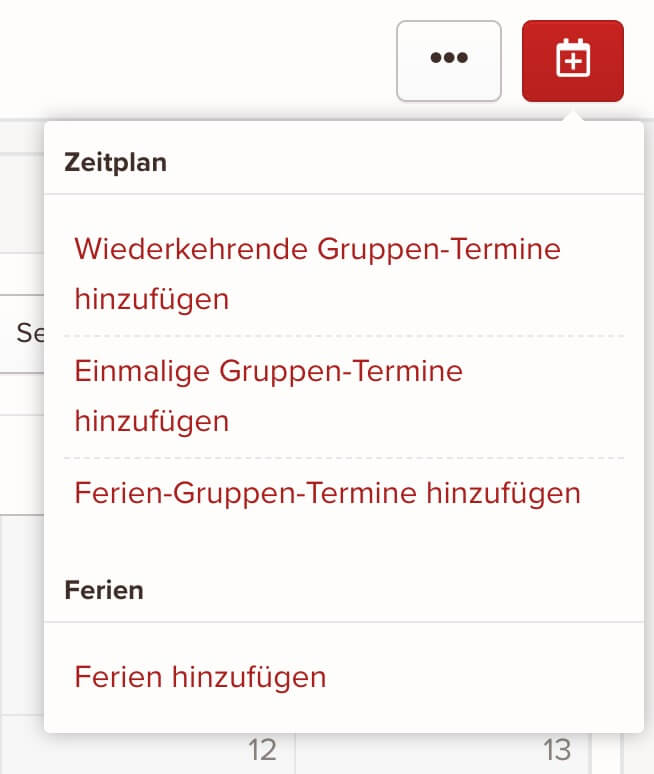
- Click the red button with the plus sign in the top right and select the appointment type you want:
- Add the session information
- Click Save once you're happy with the session information you've entered
To edit group classes and working hours:
- From the admin panel, click the My Business section and switch to the Locations or Staff section and click the location or staff member.
- Switch to the Schedule tab
- Click the session you want to edit
- Update the session information
- Click Save once you're happy with the session information you've entered
Session information
The appointments in the booking form and customer portal are generated and displayed based on the session information.
Depending on the session type, different information is available for editing.
Day of the week / date
Select the day of the week for the session. The group class or working hours take place every week on the selected day of the week from the start to the end of the specified term, except during holidays or absences. This field is required.
The day of the week field is only available for recurring and holiday appointments.
For one-time appointments, you can select a date instead of the day of the week. A one-time appointment always takes place on the selected date, even if that date falls on holidays or absences.
Start and end time
Enter the start and end time when the group class or working hours begin and end. This field is required.
Offer (group classes only)
Select the offer of the group class. This field is required.
First appointment / trial class requests (group classes only)
Group classes that allow first appointment / trial class requests are available for selection in the booking form.
If a group class isn't suitable for people visiting you for the first time, disable First appointment requests possible. The group class will then no longer be shown in the booking form.
By default, leads and new customers can book.
If you want to limit the number of first appointment bookings, you can also set a maximum here. If an appointment reaches this limit, it's no longer available in the booking form and leads can no longer book on those days.
Participant limit
If you want to use an offer together with our customer portal, you can set a participant limit per group class. This limit defines how many leads / customers can book a specific group class.
Term
The term describes the lifetime of a group class or working hours. The start of term describes when the appointment takes place for the first time, and the end of term describes when the appointment takes place for the last time.
For example, if your group classes and working hours change at the turn of the year, you can set the end of term of the expiring appointments to December 31 and the start of term of the new appointments for the next year to January 1.
Start of term is required. The term is only available for recurring appointments. Holiday appointments use the term of the selected holidays.
Holidays / absences
By default, recurring group classes and working hours do not take place during holidays and absences. Enable Also takes place during holidays / absences and add the holidays during which the appointment should still take place.
For holiday appointments, the appointment only takes place during the selected holidays.
keinaufwand for: Martial arts schools, Consulting and coaching, Yoga and Pilates, Dance schools, Gyms and fitness studios, Personal training, Swim schools, Music schools, Sports clubs, Massage and therapy practices, Dog training schools.
Enjoy the rest of your Wednesday!